Table of Contents
TLDR
Microsoft is finally pulling the plug on NTLM authentication by default. The company announced a three-phase plan to shift Windows environments towards Kerberos. Phase one is already live with auditing tools. Phase two arrives in late 2026 with migration features. Phase three will disable NTLM by default in future Windows releases. Organisations should start auditing their NTLM usage now.
Why Microsoft NTLM Deprecation Matters Now
Microsoft NTLM deprecation has been on the cards for years. The company first flagged its intentions back in 2023. Now they have committed to a proper timeline.
NTLM has been around since 1993. That is over 30 years of service. The protocol was brilliant for its time, but security threats have moved on.
The problem is simple. NTLM uses weak cryptography. Attackers can exploit it through relay attacks, replay attacks, and pass-the-hash techniques. These are not theoretical risks either. Security teams see these attacks regularly in real environments.
Microsoft’s Three-Phase Approach to NTLM Deprecation
Microsoft has structured this transition carefully. They know organisations cannot switch overnight. Legacy systems and older applications often depend on NTLM when Kerberos authentication fails.
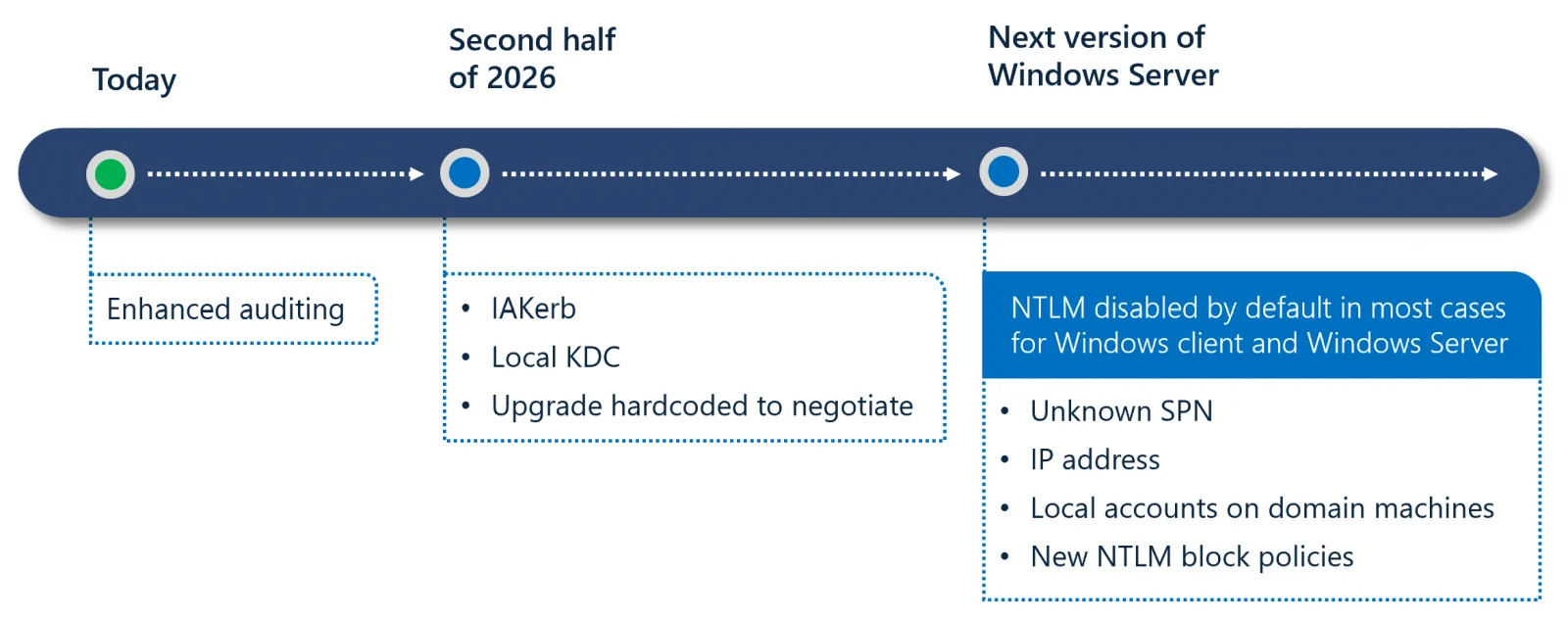
NTLM timeline (Microsoft)
Phase One: Visibility and Control
This phase is already underway. Microsoft has released enhanced NTLM auditing tools for Windows Server 2025 and Windows 11 version 24H2. These tools help administrators spot where NTLM is still being used.
The goal here is straightforward. You cannot fix what you cannot see. Security teams need to map their NTLM dependencies before they can plan their migration.
Phase Two: Removing Barriers to Kerberos Authentication
Phase two arrives in the second half of 2026. Microsoft will introduce IAKerb and a Local Key Distribution Centre. These features tackle the main reasons organisations fall back to NTLM.
IAKerb enables Kerberos authentication when a domain controller is not directly reachable. The Local KDC handles local account authentication without triggering NTLM fallback. Both features should make the transition smoother for most environments.
Microsoft will also update core Windows components during this phase. The operating system will prioritise Kerberos authentication over NTLM wherever possible.
Phase Three: NTLM Disabled by Default
The final phase coincides with the next major Windows Server release. Network NTLM authentication will be blocked by default. Organisations will need to explicitly re-enable it through policy controls if required.
Here is the thing though. Disabling NTLM by default does not mean removing it entirely. Windows will simply prefer Kerberos authentication. NTLM will remain available for edge cases like unknown Service Principal Names or IP-based authentication.
Expert Take on Windows Authentication Security
William Fieldhouse, Director of Aardwolf Security Ltd, offered his perspective on the announcement. “This is a proper step in the right direction for Windows authentication security. We have seen countless engagements where NTLM relay attacks provided an easy route into corporate networks. The phased approach gives organisations breathing room, but teams should start their audits today rather than waiting.”
Why Kerberos Authentication Beats NTLM
Kerberos has been the default Windows authentication protocol since Windows 2000. It offers several advantages over NTLM.
Kerberos uses time-stamped tickets that expire. This makes replay attacks much harder to pull off. The protocol also supports mutual authentication, verifying both client and server identity.
NTLM, by contrast, relies on challenge-response mechanisms without server verification. Its weak cryptography has been a known issue for years. Security researchers have demonstrated relay attacks against NTLM repeatedly.
Steps to Prepare for Microsoft NTLM Deprecation
Start auditing now. Use the phase one tools to identify where NTLM is still active in your environment. Look for applications that force NTLM fallback.
Map your dependencies across applications and services. Contact application developers if critical systems require updates to support Kerberos. Test NTLM-off configurations in non-production environments first.
Consider engaging a best penetration testing company to assess your current authentication posture. They can identify weak points before attackers do.
Internal network penetration testing can reveal how attackers might exploit NTLM weaknesses in your specific environment. This is particularly valuable during the transition period.
Key Dates for NTLM Deprecation Timeline
Phase one auditing tools are available now for Windows Server 2025 and Windows 11 24H2. Phase two features arrive in the second half of 2026. Microsoft has not announced a specific date for phase three, but it will coincide with the next major Windows Server Long-Term Servicing Channel release.
There is also a smaller change coming in October 2026. Microsoft will flip the BlockNTLMv1SSO registry key default from Audit to Enforce. This disables NTLMv1 authentication unless you have manually configured it otherwise.
Conclusion: Act Now on NTLM Deprecation
Microsoft NTLM deprecation marks the end of a 33-year run for the legacy protocol. The three-phase approach gives organisations time to adapt. But that time should be spent preparing, not waiting.
Kerberos authentication offers better security through modern cryptography and mutual verification. The transition will strengthen Windows authentication security across enterprise environments.
If you need help assessing your readiness for this change, request a penetration test quote to identify vulnerabilities in your current authentication setup.
Subscribe to our newsletter
Honest updates, straight to your inbox. Unsubscribe any time.